


Hercules DJ control Inpulse T7
Brand :
In stock
12-month warranty · Silent Noise support
Covers defects in materials and workmanship. Normal wear, accidental or liquid damage, and misuse are not covered.
Need help? Send your order number, product name and a description of the issue to our team.
Get product or warranty help Coverage detailsHow it works
Select BillEase as your payment method at checkout, then review your available plan and total repayment amount before confirming.
Expert advice for your setup
Need help choosing? Tell us what you want to do and what you already use. Our team can help you find the right product, check compatibility and choose the accessories you actually need.
Talk to the Silent Noise team → (opens Facebook in a new tab)MOTORIZED DJ CONTROLLER
Feel the track move beneath your hands.
A PC/Mac DJ controller with motorized 7-inch platters and real vinyl discs. Hold, release and scratch the music under your fingers while your laptop runs the tracks. DJUCED and Serato DJ Lite are included.
Vinyl discs, mixing slipmats, USB cable and power adapter are in the box.
Computer and mains power required. Headphones and speakers sold separately. Serato DJ Pro is an optional paid upgrade.
Optional extras
Choose monitoring gear or verified transport protection as needed. An Innofader is an optional upgrade, not a requirement to start.


Delivery calculated at checkout.
Questions? Contact us on Facebook (opens Facebook in a new tab)WHY CHOOSE MOTORIZED
Turntable-style touch. Music from your laptop.
The difference is physical: the platters spin beneath real vinyl discs. Catch a beat, release it and practise a scratch with your hands. T7 combines that feel with a mixer and audio interface in one controller.
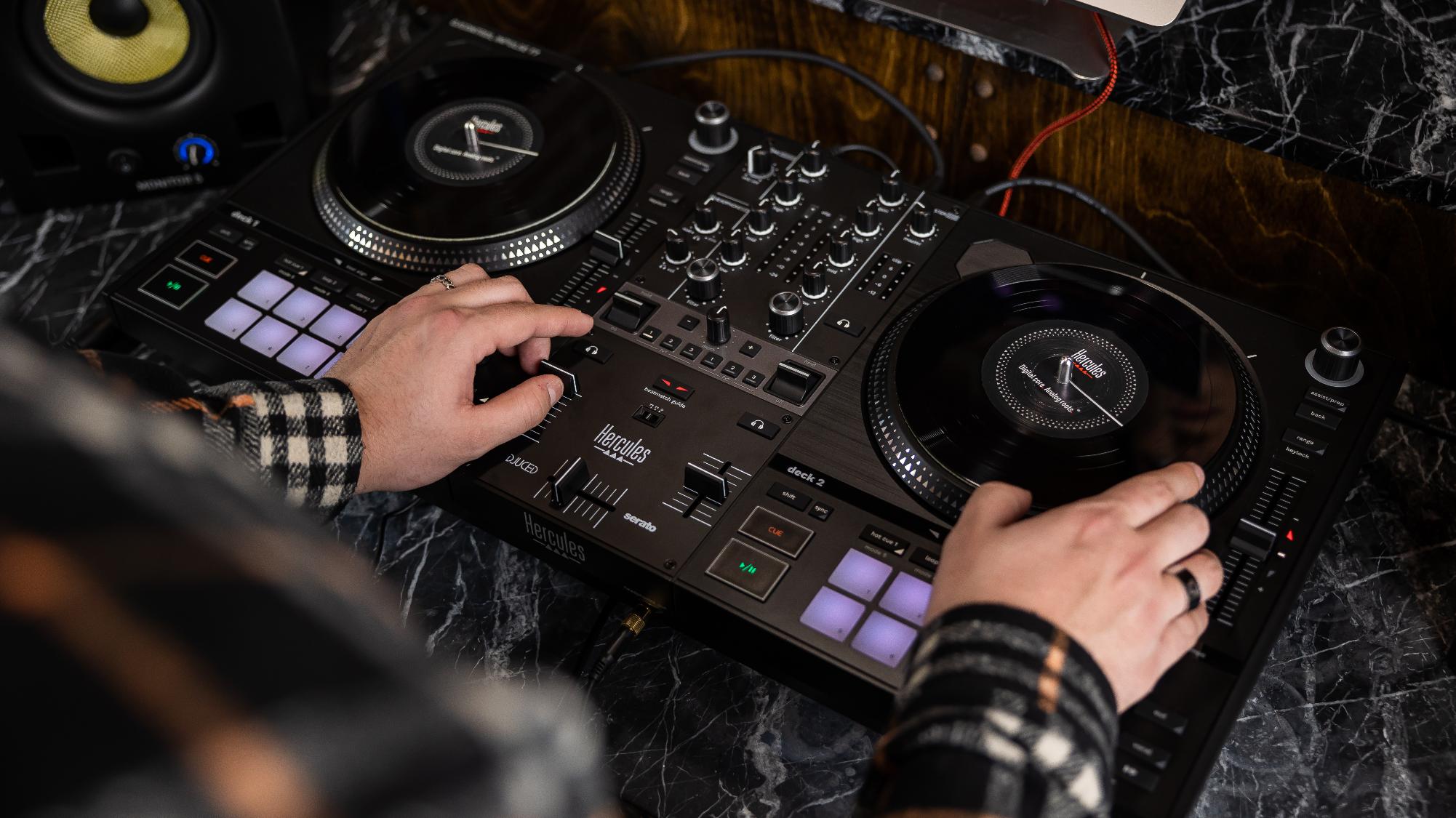
Feel the movement
Motorized 7-inch platters with separate vinyl discs and slipmats.
Start with included software
Mix with DJUCED or Serato DJ Lite; Serato DJ Pro is optional.
Know what to bring
A compatible computer, music, headphones and a power outlet. Add speakers for the room.
MOTORIZED FEEL
Practise the touch of a vinyl DJ.
Move the supplied vinyl disc over its slipmat to hold, release and scratch a track in your DJ software. Beatmatching lights help with speed and alignment as you learn. These discs control digital music; they do not play recorded vinyl albums.
MIX AND PERFORM
Turn a mix into a hands-on routine.
Use the pads for cues and loops, the paddles for supported effects, and the vocal/instrumental controls for software Stems. Stems separate parts of a song, giving you more ways to blend or create a live edit. Available functions depend on the software you use.
TAKE YOUR SETUP WITH YOU
Lift it. Connect it. Play your set.
Carry handles and retractable feet make setup more practical. Connect powered speakers through XLR or RCA and cue through the headphone output. Use the included power adapter; this motorized controller is not powered by USB alone.
The essentials
| Controller | 2 decks · motorized 7-inch platters |
|---|---|
| Speaker outputs | XLR · RCA |
| Headphone outputs | 3.5 mm · 6.35 mm |
| Mic input | 6.35 mm |
| Software | Serato DJ Lite · DJUCED; Serato DJ Pro sold separately |
| Power | External power adapter included |
| Product dimensions | 65.2 × 35 × 9 cm |
| Product weight | 5 kg |
Product measurements refer to the equipment, not the shipping package.
In the box
- Inpulse T7
- Power adapter and USB cable
- Vinyl discs and mixing slipmats
- DJUCED and Serato DJ Lite software
- Documentation
Computer and mains power required. Headphones and speakers sold separately. Serato DJ Pro is an optional paid upgrade.
A few things to know.
What do I need to start?
Bring a compatible Windows PC or Mac, music, wired headphones and a power outlet. Use the supplied USB cable and power adapter. Install DJUCED or Serato DJ Lite, select the T7 audio device and check your cue/main output. Powered speakers and matching audio cables are needed to play for a room.
Do I need to pay for DJ software to start?
DJUCED and Serato DJ Lite are included. You can start learning with either; Serato DJ Pro is a separate optional paid upgrade. Music files and paid streaming subscriptions are separate.
Is it suitable if I have never scratched before?
Yes, if vinyl-style control is what you want to learn. Begin with simple holds, releases and beatmatching before adding more advanced scratches. The guides and included software support practice; the motorized platters do not perform the technique for you.
Does it play regular vinyl records?
No. The supplied vinyl discs control music running in your DJ software. T7 is not a record player and needs a compatible computer.
What is different about T7 Premium?
Premium adds an installed Premium Fader Module, gold details, a semi-rigid EVA carry case and extra scratch slipmats. Both versions have motorized 7-inch platters. Serato DJ Lite and DJUCED are included; Serato DJ Pro is a separate paid upgrade.
Do I need an Innofader or another case?
The supplied faders are ready for mixing and scratching. A compatible Innofader is optional and requires installation and calibration. Standard T7 does not include a carry case; choose protection explicitly verified for this model.
Only logged in customers who have purchased this product may leave a review.
You may also like…


Reviews
There are no reviews yet.